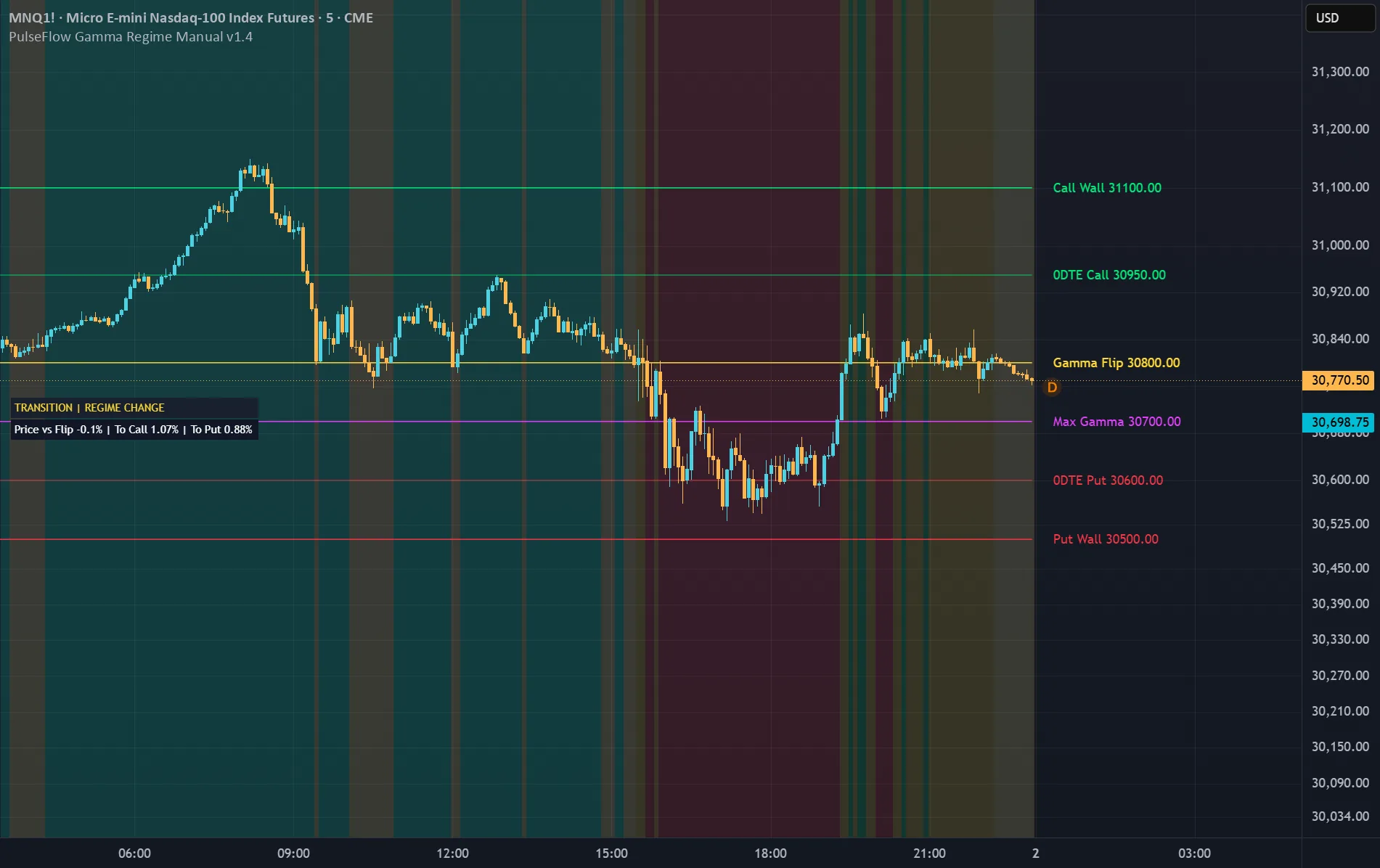
Before the New York open, a handful of gamma levels suggest whether dealers are likely to dampen the next move or chase it. PulseFlow Gamma Regime Manual brings those levels onto your NQ/MNQ or ES/MES chart as a manual context layer.
See the levels that matter
Gamma Flip (the estimated price where gamma changes sign), Call Wall, Put Wall, Max Gamma/Pin and the optional 0DTE walls appear as thin lines with text labels. A background color shows the regime, read from the Flip or, if you prefer, from Net GEX: green when gamma is positive and moves tend to be dampened, red when it is negative and moves tend to stretch further, yellow near the Flip, where the regime may be changing.
Read it at a glance
A compact two-row panel shows the regime and how far price is from the Flip, the Call Wall and the Put Wall. Four alerts let you know when price closes above or below the Flip, above the Call Wall or below the Put Wall.
Enter the levels in seconds
Pine Script cannot read the internet, so once a day, before the New York open, you enter the levels from a free gamma-data provider: paste them as one line, or type them into the individual fields. It runs on a TradingView Basic account.
This is market context, not an entry or exit signal. Gamma levels are modeled estimates that can differ between providers.
View on TradingView ↗See the levels that matter
Gamma Flip (the estimated price where gamma changes sign), Call Wall, Put Wall, Max Gamma/Pin and the optional 0DTE walls appear as thin lines with text labels. A background color shows the regime, read from the Flip or, if you prefer, from Net GEX: green when gamma is positive and moves tend to be dampened, red when it is negative and moves tend to stretch further, yellow near the Flip, where the regime may be changing.
Read it at a glance
A compact two-row panel shows the regime and how far price is from the Flip, the Call Wall and the Put Wall. Four alerts let you know when price closes above or below the Flip, above the Call Wall or below the Put Wall.
Enter the levels in seconds
Pine Script cannot read the internet, so once a day, before the New York open, you enter the levels from a free gamma-data provider: paste them as one line, or type them into the individual fields. It runs on a TradingView Basic account.
This is market context, not an entry or exit signal. Gamma levels are modeled estimates that can differ between providers.
Price
Prices are not active because of TradingView's new rule, which takes effect on 1 November. Create your account and tick "Notify me": we will email you when they are.
Notify me